
ADDDDD MEEEEEE!!!
Using claude code to run experiments and grade itself using sub agents!
Top marks #
- "Eval" is overloaded — a grader is the specific, useful thing: it scores one model’s output against a rubric
- Use one for subjective, usually creative tasks (prose, images, translation) where "good" is hard to check programmatically
- It works best with examples and a specific, numerically scored rubric typically using a 0-10 scale
- Cheapest first move: hand the original agent the rubric and ask it to score itself — often fixes the output in the same turn
- Don’t grade with the same model and prompt that produced the output — the bias compounds (use a subagent)
- The real work is the feedback loop: expect 3+ rounds, and re-check when the model changes
Can we call it a grader? #
"Eval" has become the catch-all term in AI for everything from benchmark suites to vibe checks to production monitoring. It’s so overloaded it barely means anything.
A grader is a specific, useful thing: a system (usually an LLM, sometimes a script) that scores the output of another LLM against a rubric. You know what a grader does. You had one in school. It looks at your work, checks it against criteria, and gives you a score with feedback.
An eval is a category. A grader is a tool you can build and iterate on.
When you need one #
- Any AI task where "good" is subjective or hard to define programmatically
- Image generation, prose writing, code review, translation, summarization, content moderation
- Any task where you plan to iterate on the prompt — you need a way to know if the new version is actually better
- Probably don’t need a grader if:
- The output is deterministically checkable (JSON schema validation, unit tests, exact string match)
- The output is temporary/intermediate: EG brainstorming, riffing/vibing, other collaboration
What goes wrong #
- No examples: Asking an LLM to grade without showing it what "good" looks like produces random scores
- Vague rubric: "Score originality from 1-10" means little. What’s the difference between a 5 and a 7? If you can’t describe it, the grader can’t score it.
- Vague or incomplete prompts: If the original prompt producing the output is not well fleshed out, the grader just confirms the output is bad. Fix the prompt first.
- Grading your own homework: Using the same model and same system prompt to both produce and grade output. The biases compound — the model will be systematically generous toward outputs that match its own patterns.1
Try self-scoring first #
Before you build a separate grader and a full iteration loop, try the cheapest thing: give the original agent the rubric and ask it to score its own output.
- Often the model can see the gap once the criteria are explicit in front of it
- A low self-score frequently triggers a better second attempt in the same turn — no separate grader needed
- This can save several iterations of building and tuning a dedicated grader
- It works precisely because most bad output comes from a vague task, not a weak model — the rubric supplies the missing definition of "good"
The caveat is self-enhancement bias: a model grading its own work tends to be generous.1 Self-scoring is a fast first pass, not a substitute for an independent grader on anything that matters.
What you actually need #
- 2+ examples with scores and short explanations of why each got that score
- Specific rubric on a 0-10 scale with descriptions at key anchor points (what does a 0 look like? a 5? an 8? a 10?)
- Clear system prompt that includes the task context, the rubric, and the examples
- Separate user prompt for each item being graded — the thing you’re actually scoring, e.g. the blog post text
- A different model - not always possible or necessary, but a totally different model from a totally different provider can help keep things objective
An example: our blog-post rubric #
Here’s the rubric we grade wrunk.dev posts against — this is the canonical version. Each dimension scores 0–10:
- One clear point, led with — a single takeaway, stated up front, not buried
- ✓ Opens with "Use a window manager — here’s the 5-minute setup"
- ✗ Three paragraphs of backstory before the actual advice
- ✗ Two competing theses fighting for the same post
- Concise & information-dense — no filler; survives a "cut 30%" pass
- ✓ "Sonnet is usually plenty for writing"
- ✗ "It is also worth bearing in mind that, in many cases, one might consider…"
- ✗ A 400-word section a 6-bullet list would cover
- Scannable — H2 signposting, short paragraphs, bullets, disciplined emphasis
- ✓ You can grasp the whole post from the H2s alone
- ✗ A wall of 8-sentence paragraphs, no headings
- ✗ Half the sentences bolded "for emphasis"
- Accurate & current — claims correct, sourced where load-bearing, nothing outdated
- ✓ "Meta added an AI-assisted interview (Oct 2025)" — with a link
- ✗ "GPT-4 is the latest model" (outdated)
- ✗ A confident statistic with no source
- Voice — friendly, technical-but-readable, neutral; consistent with the rest of the site
- ✓ "It had a good run, but I don’t want to install Rosetta"
- ✗ Hype or snark ("this changes EVERYTHING")
- ✗ Stiff corporate tone ("leveraging synergies to…")
The gate — a hard cap. Some flaws are disqualifying no matter how good everything else is. If a post has a factual error, a load-bearing claim with no source, or an obviously outdated take, its score is capped at 4/10 — even if all five dimensions would otherwise be 9s and 10s. The reason: a polished post that’s wrong costs more trust than a plain post that’s right, so no amount of style buys back a credibility miss.
It’s deliberately about the quality bar, not the topic. The ✓/✗ above are illustrative anchors; a production grader still needs 5+ fully scored example posts before it judges reliably.
Another example: grading vector drawings #
LLMs are still shaky at vector art — the SVG infographics in these posts took real iteration. A grader makes that iteration tractable. The dimensions, each 0–10:
- Subject match — recognizably the thing asked for; a "dog" that reads as a dog
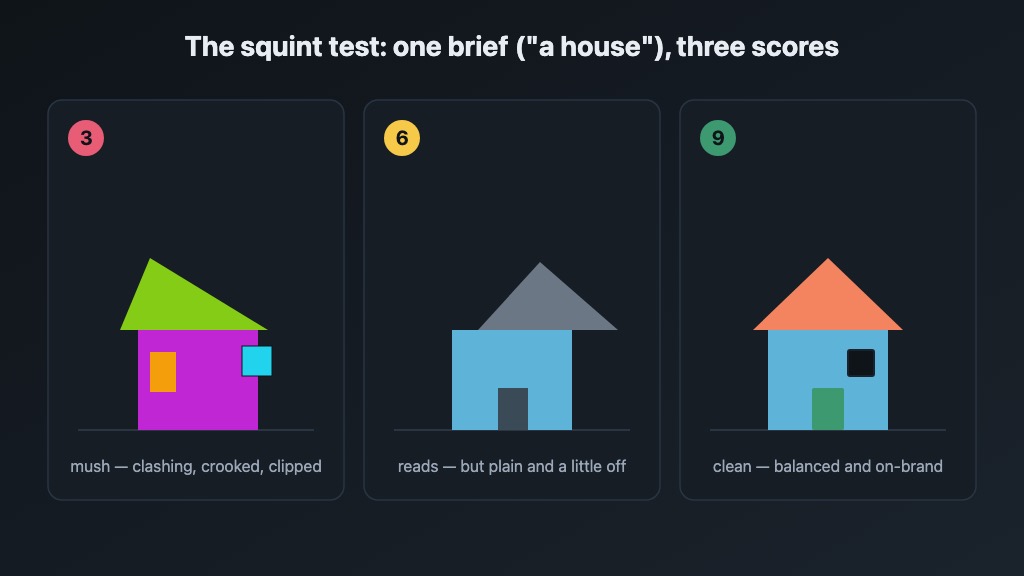
- Legibility at size — clear at a glance and at thumbnail size, not a tangle of paths
- Composition — balanced and aligned; uses the canvas, nothing crammed or floating in dead space
- Palette — on-brand colors, enough contrast, not garish
- Text (if any) — labels fit and align; nothing clipped or overflowing its box
- Technical validity — valid SVG, renders the same across viewers, a sane path count
The gate — a hard cap. If it doesn’t render, or you can’t tell what it’s supposed to be, it’s capped low — nothing else matters.
The tell that this rubric works: scores track the squint test. Shrink the drawing to a thumbnail — a 9 still reads, a 3 turns to mush.
The feedback loop is the real work #
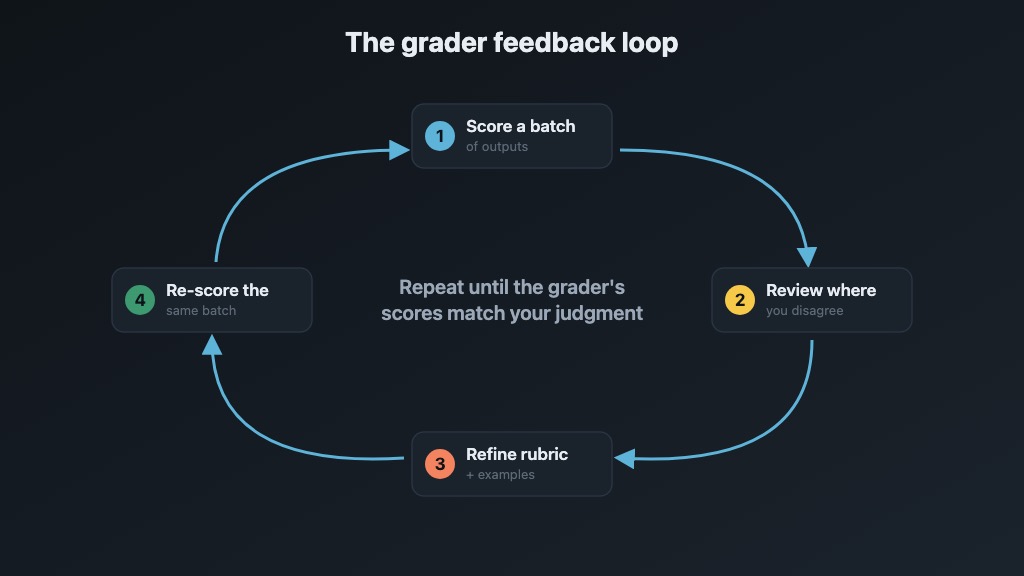
- Grader scores a batch of outputs
- You review the scores — especially the ones you disagree with
- You refine the rubric and examples based on what the grader got wrong
- Re-run the grader on the same outputs
- Repeat until the grader’s scores match your judgment consistently
Expect 5-10 iterations before a grader is useful. The rubric and examples are living documents. Update them as you learn what "good" actually means for your use case.
When the underlying model changes (and it will — regularly), re-run your grader on a fixed set of outputs. Scores will drift.
Practice is the thing people skip #
Building a good grader requires you to deeply understand what you want. Most people skip this step and then wonder why their AI output is mediocre.
- The act of writing examples forces you to define "good" concretely
- The act of writing rubric entries forces you to articulate the differences between good, acceptable, and bad
- This is true for image generation, prose, code, translation — anything creative or subjective
- The grader is a byproduct. The real output is your own clarity about the task.
Footnotes #
- Known as "self-enhancement bias" in the LLM-as-judge literature. Models systematically rate their own output higher than output from other models. Position bias (preferring the first option in a comparison) is another well-documented issue. Using a different model or different prompting strategy for grading helps mitigate both. ↩